Building My Own Multi-Computer AI Agent Control Center: From Herdr and ntfy to Chrome Remote Desktop
It began with seeing how DHH and Tobi Lütke manage AI agents
This whole project did not originally start because I wanted to set up a notification server.
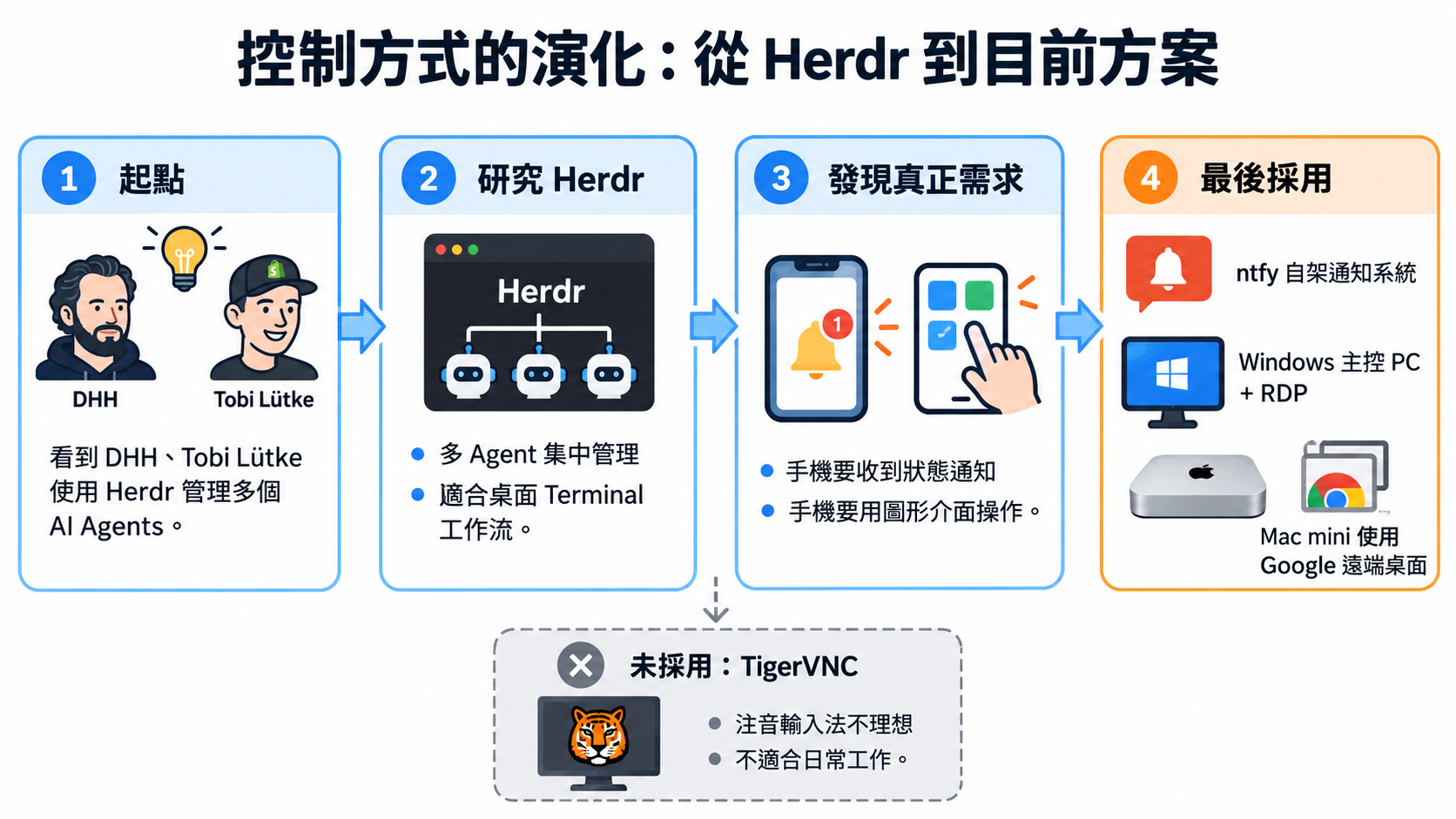
The real starting point was seeing DHH and Tobi Lütke use Herdr to manage multiple AI agents. It made me wonder: when Claude Code and Codex work for long periods across different computers, how should a person manage them?
My own workflow was also moving toward multiple computers and agents. One Windows PC might run Claude Code and Codex simultaneously, another would handle a different project, and my Mac mini had its own Claude Code and Codex. The machines did not necessarily use the same accounts or do the same kinds of work.
One of the biggest benefits of AI agents is that I do not have to sit beside them constantly. I can hand over a work order, and they can read files, make changes, run tests, fix problems, and keep going.
But as the number of machines grew, a new problem quickly appeared: how do I know which agent is waiting for me right now?
With multiple agents, the human becomes the monitoring program
With just Claude Code or Codex, this problem is not obvious. The terminal is right in front of me, so when the agent asks a question, I can answer it.
But with three or four computers working simultaneously, I might check PC1 and find it still running, then PC2 and find the same, only to open the Mac mini and discover that Codex has been waiting half an hour for an answer.
That is rather absurd.
I started using AI agents to reduce the time I spent waiting at a computer. Yet as the number of agents grew, I found myself constantly checking every machine. With five computers each running Claude Code and Codex, the human could quickly become the busiest monitoring program in the entire system.
So when I saw Herdr, my first thought was: could this solve exactly that problem?
Exploring Herdr: a good direction, but not my most urgent need
What attracted me to Herdr was that it was genuinely designed around managing many coding agents at once. It brings Claude Code, Codex, and other sessions from different terminals together, showing which agents are working, blocked, or finished.
For someone sitting at a desktop operating many agents, that design makes sense. I also investigated running Herdr across multiple machines: each Windows PC and Mac would retain its own Claude Code/Codex accounts and sessions, with a control center for viewing and operating them centrally.
Different computers using different Claude Code or Codex accounts is not really a problem, because Herdr manages terminal sessions rather than the AI services’ accounts.
After researching it for a while, however, I realized that centrally viewing every agent might not be my most urgent need.
If an agent is working normally, I do not want to watch it at all. Reading files, modifying code, running tests, and creating documentation do not need me.
I only need to know about a few states: it needs an answer, needs approval, encounters an error, or has finished.
In other words, rather than seeing all agents at all times, I want them to call me only when they need me.
Herdr is more like a control center, while what I most needed then was a notification system.
That was where the direction changed.
ntfy: the tool that actually fit my needs
After some research, I found ntfy.
Its concept is simple: a program sends an HTTP request, and a phone app receives a push notification. That fits AI agents very well, because Claude Code and Codex already provide event hooks.
An agent can notify an external program at the moment an event such as Ask, a permission request, or Stop actually occurs.
I do not need terminal OCR, screen-text parsing, constant polling, or screenshots every few seconds to decide whether an agent is stuck.
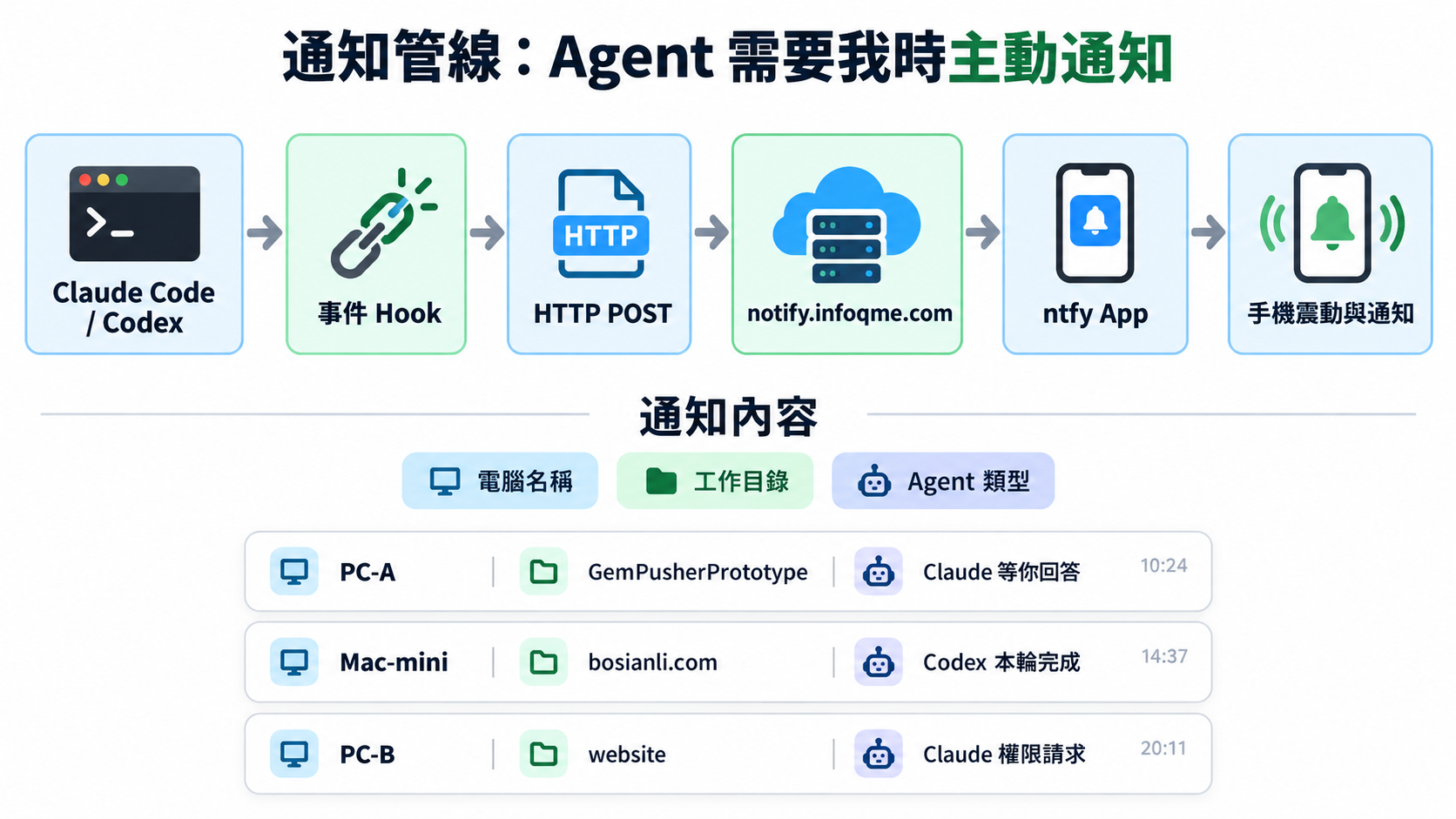
The entire notification pipeline can be reduced to: Agent → Hook → ntfy → Phone.
I happened to have my own VPS and domain
ntfy offers a public service, but I expected this setup to become long-term agent infrastructure. Since I already had a VPS and a domain, why not host it myself?
That would give me full control of the notification system, and building it was itself a good task for an AI agent.
An interesting situation emerged: I started asking an AI agent to build a system for managing AI agents.
My VPS runs Windows Server and already had IIS. Rather than writing a separate ASP.NET notification application, I used IIS for HTTPS, SSL, reverse proxying, and WebSocket connections, with ntfy as the actual backend.
ntfy runs as a Windows service, with its backend listening only on local loopback. Its service port is not exposed directly to the internet.
Permissions are separated too: the publisher account used by agents can only send notifications, the reader account on my phone can only read them, and anonymous access is blocked.
Finally, I verified HTTPS, WebSocket, ACLs, publishing, reading, and denial of anonymous access. Once all checks passed, the first truly important pipeline was complete.
Connecting both Claude Code and Codex to hooks
Next came installing hooks on every agent computer.
At first, I considered distinguishing Claude account A, Claude account B, and different Codex accounts. Later, I realized that this information was not important.
Three things actually matter: which computer, which working directory, and which agent.
The phone notifications only need to look something like this:
- PC-A / Case-A / Claude is waiting for your answer
- Mac-mini / bosianli.com / Codex has completed this turn
- PC-B / website / Claude requests permission
At a glance, I know which computer and project need attention.
The account logged into Claude or Codex does not need to appear in the notification at all.
The real next question: how do I act on a notification?
Once push notifications were solved, the second problem naturally appeared.
Suppose my phone tells me: “PC3 / Case-A / Claude is waiting for your answer.”
How do I answer?
If I am sitting at PC3, it is easy. But what if I am elsewhere, perhaps with only my phone?
I could of course use Claude or ChatGPT Codex on my phone, but if several Claude Code instances use different accounts, I cannot exactly carry several phones around.
So I returned to the Herdr approach.
Why I ultimately did not use Herdr
Herdr’s approach to agent management is good, but one condition was essential to my habits: I do not want to operate a terminal on my phone.
SSH → TUI → select session → enter terminal → operate Claude is technically possible, but it is not the phone experience I want.
I want a normal graphical interface where I can tap, swipe, zoom, and type, and handle things beyond the agent when necessary.
I also investigated Herdr Web UI/PWA-style solutions. These were closer to what I wanted, but raised another issue: a web control center that can operate agents on every computer becomes a very privileged entry point.
Tailscale, tokens, device pairing, ACLs, and SSH keys could certainly secure it well. But at that point I started asking myself again: am I rebuilding an entire platform to solve a problem that mature tools already solve?
Because I was already very familiar with one tool: Chrome Remote Desktop.
I already used my phone to control computers
I regularly operate my computers through the Chrome Remote Desktop phone app, so remote control from a phone required no new learning.
The remaining question was whether one Windows PC could act as the control center and connect onward to the other agent computers.
The answer was yes.
Windows-to-Windows RDP is already a mature solution. A Windows control PC can connect directly to other Windows agent PCs through RDP.
By first connecting my phone to the Windows control PC through Chrome Remote Desktop, I can access those RDP sessions and operate Claude Code, Codex, and other applications on those machines.
At this point, the system was very close to what I wanted. Only the Mac mini remained.
Controlling a Mac from Windows: starting with VNC
macOS already provides Screen Sharing, so the obvious design was to connect from a VNC client on the Windows control PC to the Mac mini.
I chose the free TigerVNC. Testing showed that the display, mouse, keyboard, and basic operations worked, with tolerable latency because Windows and the Mac mini were on the same local network.
It looked good initially—until I started typing Chinese.
TigerVNC lost out over Zhuyin input
With Windows → TigerVNC → macOS Screen Sharing, I could not use my usual Zhuyin Chinese input method properly.
That might not matter much for some server-maintenance tasks. But my Mac mini is used for Codex, Claude Code, WordPress, Chrome, articles, and website content, which involve a great deal of Chinese typing.
If Zhuyin does not work properly, it is unsuitable for my everyday remote desktop.
So TigerVNC was ultimately eliminated.
The problem was not that VNC could not connect. A small issue I would encounter every day made the overall experience unacceptable.
This was typical of the whole exploration: an architecture diagram can look right without being suitable in actual use.
Chrome Remote Desktop solved the problem
I then switched the Mac mini to Chrome Remote Desktop too.
Everything I actually needed worked: Zhuyin input, keyboard, mouse, GUI, Chrome, Finder, Codex, and Claude Code. My phone could also connect directly to the Mac mini.
In the end, I accepted a design that looked less elegant but worked well: the Windows control PC operates the Mac mini through Chrome Remote Desktop.
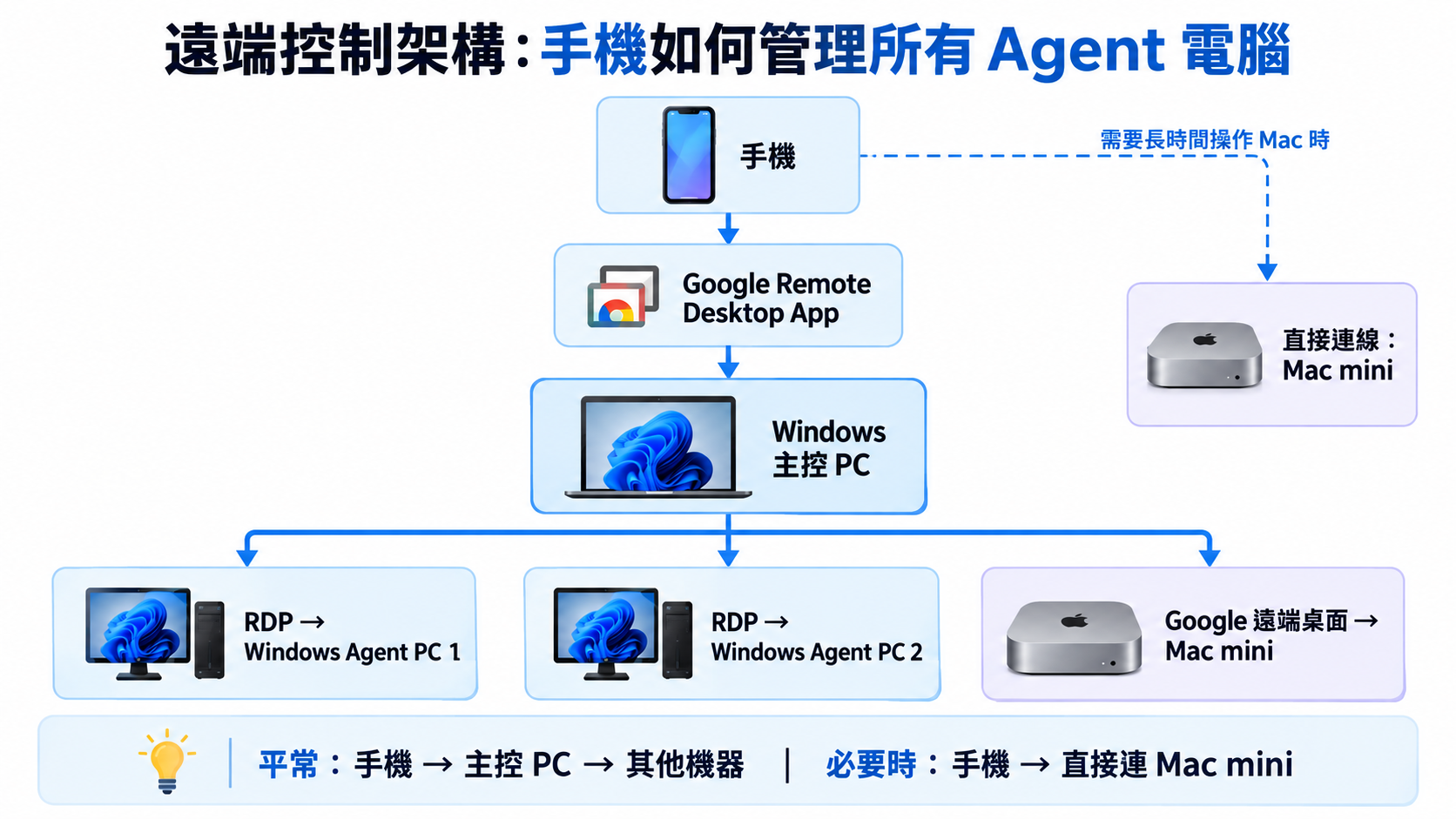
Even accepting remote desktop inside remote desktop
When I am away and use my phone to operate the Mac through the control PC, the route is: Phone → Chrome Remote Desktop → Windows control PC → Chrome Remote Desktop → Mac mini.
That is remote desktop inside remote desktop.
In theory, it is certainly not the most elegant solution. The screen is transmitted twice, and latency is inevitably higher than with a direct connection.
But my main work is not gaming, video editing, or high-frame-rate imagery. It is agents, text, terminals, WordPress, browsers, and Finder. For those tasks, the tradeoff is acceptable.
For a longer Mac session, I can also connect directly from the phone’s Chrome Remote Desktop app to the Mac mini, bypassing the Windows control PC.
So I retained two routes: normally, the phone enters the control PC for centralized management; for extended Mac work, it connects directly to the Mac mini.
The completed architecture
The current system divides into two clear parts.
The first is notifications: Claude Code and Codex on Windows and Mac use hooks to send events such as questions, completion, and permission requests to my private ntfy server, which pushes them to my phone.
The second is control: my phone connects to the Windows control PC through Chrome Remote Desktop. That PC connects to Windows agent PCs through RDP and to the Mac mini through Chrome Remote Desktop. When necessary, the phone can connect directly to the Mac mini too.
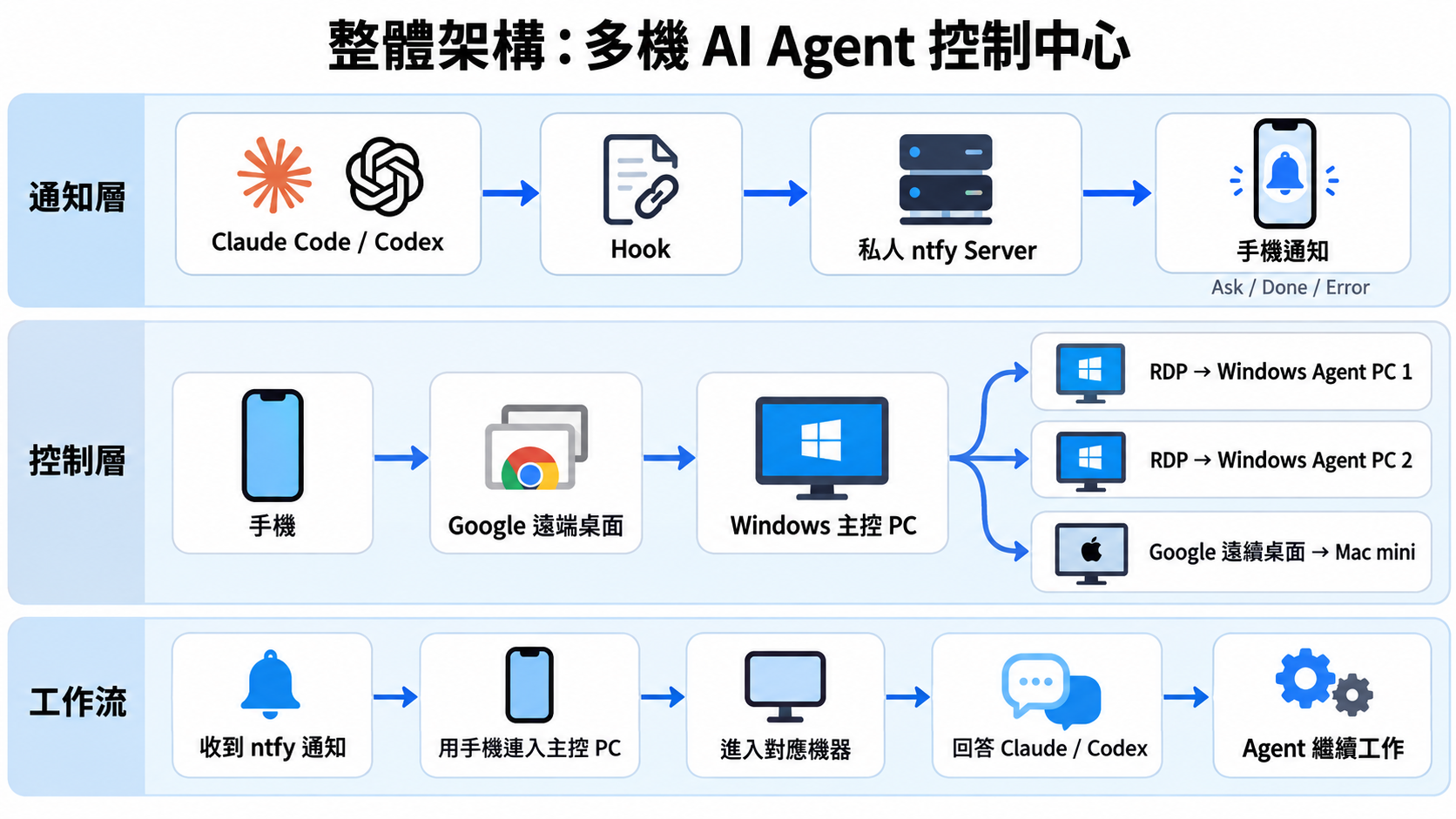
The workflow became very simple
Normally, Claude Code and Codex work on their own, and I do not keep watching.
When they need me, a hook sends the event to ntfy and my phone vibrates. The computer name, working directory, and agent type tell me where to go.
I then use Chrome Remote Desktop on my phone, connecting onward from the control PC to the appropriate machine if necessary, to answer or approve permission. Once done, I leave the remote session and the agent continues working.
That is all.
From copying someone else’s workflow to finding my own
Looking back, the most interesting part is that this began with seeing DHH and Tobi Lütke manage AI agents through Herdr. My initial direction was therefore: should I build a Herdr control center too?
After research and practical testing, the final answer was completely different.
What I actually valued was phone push notifications, a phone GUI, Chinese input, full desktop control, and familiar operation—not a unified terminal UI.
What remained was ntfy + Hooks + RDP + Chrome Remote Desktop, without Herdr.
That does not mean Herdr is bad. It means someone else’s best workflow is not necessarily your own.
AI agents helped build the entire system too
Another interesting aspect is that much of this system for managing AI agents was itself built with their help.
That includes the IIS + ntfy server work order, Windows service, reverse proxy, ACLs, WebSocket verification, Claude Code hooks, Codex hooks, Windows/macOS installation scripts, tests, and rollback.
Rather than configuring every machine manually, step by step, I first organized my requirements into work orders and gave them to Claude Code or Codex.
When PowerShell compatibility problems appeared, I reported the errors, revised the work order, and ran it again rather than starting over manually.
This increasingly convinces me that the very idea of installing software may change.
Previously, it meant downloading an installer → Next → Next → Finish.
Now it might mean downloading a work-order package → handing it to an AI agent → checking the environment → building → testing → rolling back on failure → delivering a complete system.
And this installation package is not a fixed binary. It can understand your environment, change settings, avoid existing services, and even produce different versions according to your needs.
That may be one of the most interesting effects AI agents have on how we use software.
My current understanding of a multi-agent workflow
After completing this, I care less about whether I can see ten agents on screen at once.
If all ten are working normally, I do not need to see them.
Perhaps only Agent 3 needs an answer, Agent 7 has failed, and Agent 9 has finished.
So I now think the most important first layer of a multi-agent system is Attention Routing: which agent actually needs a person’s attention?
Let the computers filter that first, and involve a human only when truly necessary.
Finally
The whole pipeline is now connected: Claude Code/Codex → Hook → ntfy → Phone notification. When intervention is needed, I use the phone → Chrome Remote Desktop → Windows control PC → RDP/Chrome Remote Desktop → the relevant agent computer.
It is not a dazzling new platform. Most of its components are mature tools that have existed for a long time.
What is new is reconnecting them around the way AI agents work.
I no longer need to ask, “How far has Claude got?” or patrol different computers every ten minutes.
When everything is normal, I do not have to manage it at all.
When something comes up, it finds me.
That is the way of working that currently feels true to the agent concept for me.